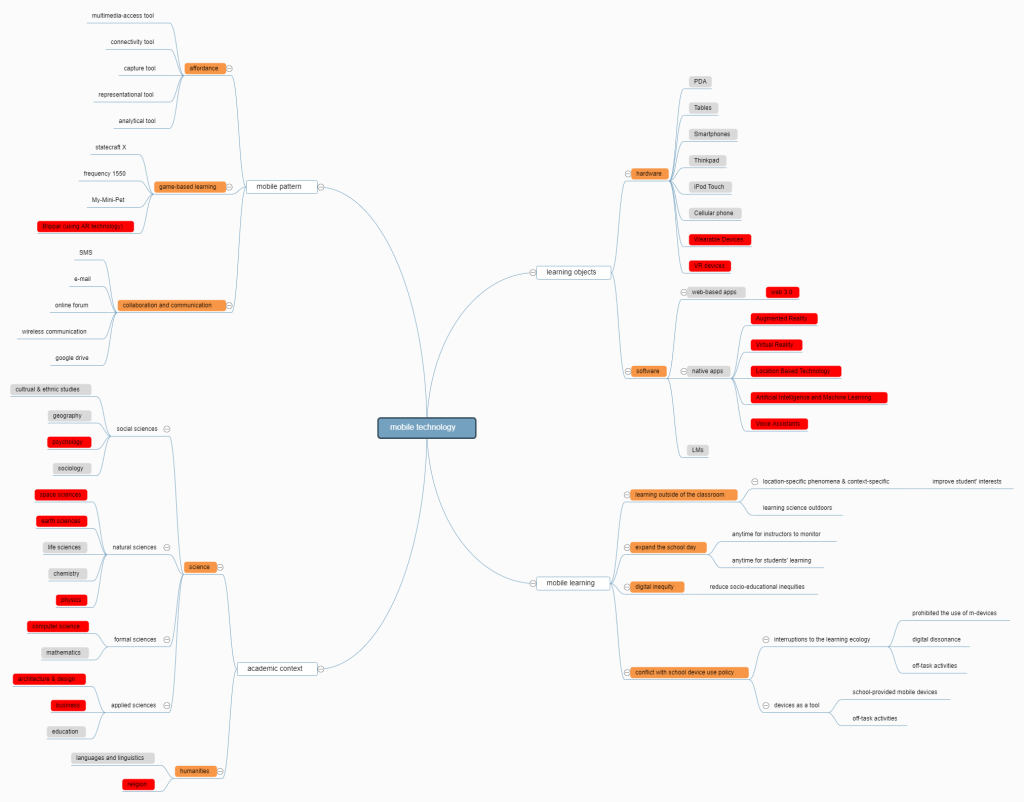
In this session, we have finished two tasks: first, we search some useful teaching apps and try to recommende these to other classmates; second we drew a mind map to show the major areas of educational research involving mobile technology.
1. Recommended Apps
In this session, we were try to find out some tools that support classroom teaching, such as those that support connection to a projector, mark-book, presentation tools, and classroom management tools. Examples of Apps are Moodle, Clicker School, TeacherPal, Prezi Viewer, Slides Shark, LanSchool Teacher. We recommended some apps below:
(1)Teaching App
| App Title | Nearpod |
| Location | https://nearpod.com/ |
| Short Description | Create interactive lessons in minutes Save prep time by importing existing lessons (pdfs, jpegs, ppts) and adding Virtual Field Trips, Collaborate boards, Quizzes, Polls, Matching Pairs activities + more.Or, start in Google Slides add your favorite nearpod activities. |
| How this App can be used in the RASE learning design? | Students can use this app to give their teachers immediate feedback, and encourage students to give peer assessment. |
(2)Notes apps
| App title | Onenote |
| Location | https://www.onenote.com/download?omkt=zh-TW |
| Short Description | Organize your thoughts, discoveries, and ideas and simplify planning important moments in your life with your digital notepad. Microsoft OneNote lets you take notes on your phone and sync them across all your devices. With OneNote, you can plan a big event, seize a moment of inspiration to create something new, and track your list of errands that are too important to forget. Take notes, write memos and make a digital sketchbook right on your phone. Capture pictures and add images to your notes. Sync notes across your devices to access them anytime, anywhere. Save ideas and check your list at home, in the office, or on the go across your devices. Search your notes quickly and effortlessly. |
| How this App can be used in the RASE learning design? | Resource: to record and synchronize useful materials across devicesActivity: to make notes or annotation in classSupport: building personal e-profile mobile knowledge management device Evaluation: Create a checklist of things-to-do, things-to-bring, and places-to-go and to demonstrate the organizational effectiveness of the app in assisting the management of daily life. |
(3)Blogging Apps
| App title | |
| Location | https://www.weibo.com/hk |
| Short Description | Weibo is a kind of broadcast social media and network platform based on user relationship information sharing, dissemination and acquisition, which shares short real-time information through attention mechanism. Users can access through PC, mobile phone and other mobile terminals, and realize real-time information sharing, dissemination and interaction in the form of text, picture, video and other multimedia. |
| How this App can be used in the RASE learning design? | People can use this app to post their feelings or learning experience with pictures or videos in time. Also, other people can give comments on it. |
(4)Communication app
| App Title | |
| Location | https://www.wechat.com/en/ |
| Short Description | WeChat is more than a messaging and social media app – it is a lifestyle for over one billion users across the world. Chat and make calls with friends, read news and use local services in Official Accounts and Mini Programs, play fun games with friends, enjoy mobile payment features with WeChat Pay, and much more. |
| How this App can be used in the RASE learning design? | Resources: video, related link posting in a relevant subject,homework assign.Activity: online game based learning.Support: knowledge sharing, forum and online tutitorial.Evaluation: questionaire, peer assessment |
(5)Drives app
| App Title | google drive |
| Location | https://drive.google.com/ |
| Short Description | A cloud drive that can be used to store files in it. It could be synced with another account aside from Google Account. |
| How this App can be used in the RASE learning design? | It could be used to store students’ files so they could share it with their peers without using flash disk as the traditional transferring files. |
2. Mind Map
In this task, we read the paper《A Look at Research on Mobile Learning in K–12 Education From 2007 to the Present》, and identifed major areas of educational research involving mobile technology. Based on this paper, we draw a mind map tool to show major areas of educational research involving mobile technology. The other important areas have developed since 2014 that the paper did’t mention were marked red. If you want explore more, please visit: https://www.mindmeister.com/1361418112?t=NJl8UsuRcG#.
 Nice2MeetU Group's E-Portfolio