Alone we can do so little; together we can do so much.
— Helen Keller.
This website covers our group e-portfolio from 6025 course (Teaching and Learning with IT). We hope that it could bring new knowledge to all of our website readers, and influence them to join us in MITE HKU. Cheers!
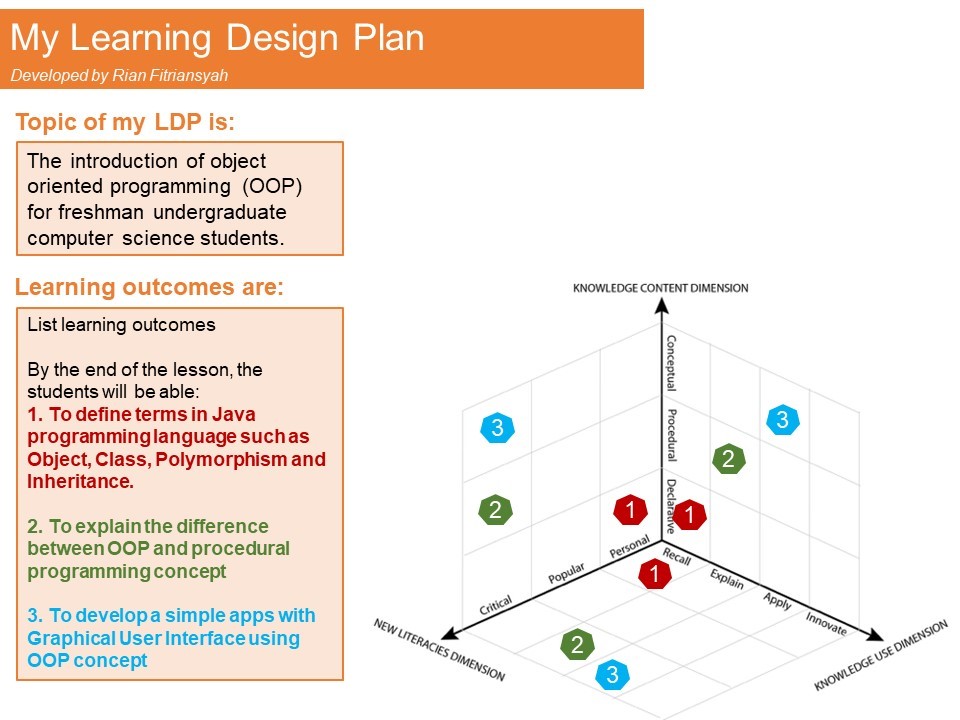
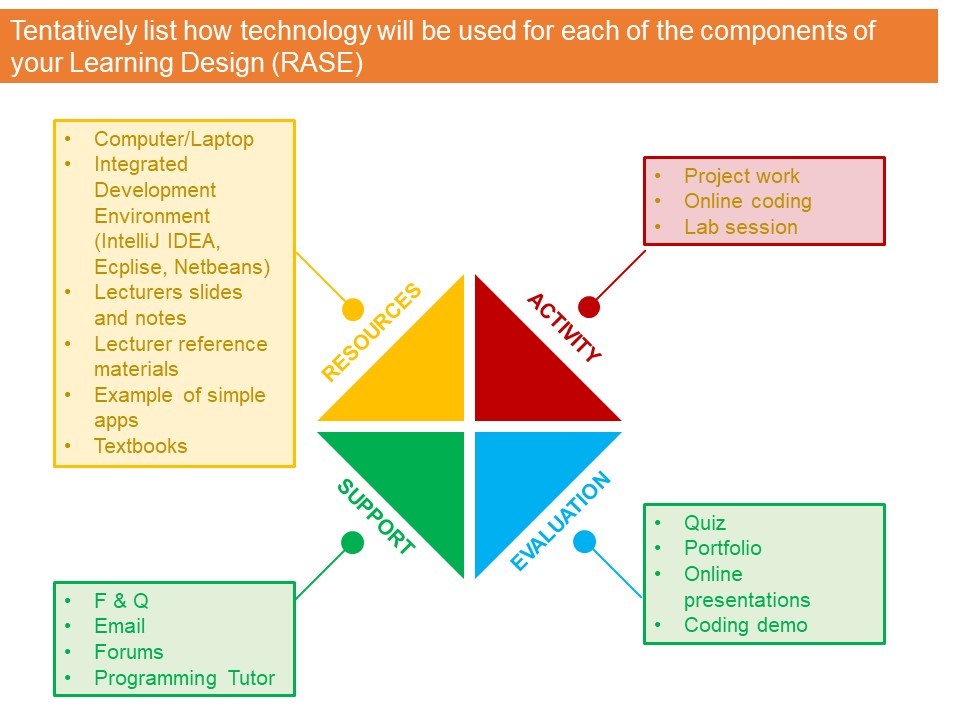
In this activity, we were creating our plan for individual assignment. Each of us had to present it in our teammates so we could have a constructive feedback. Here are our learning design plan.
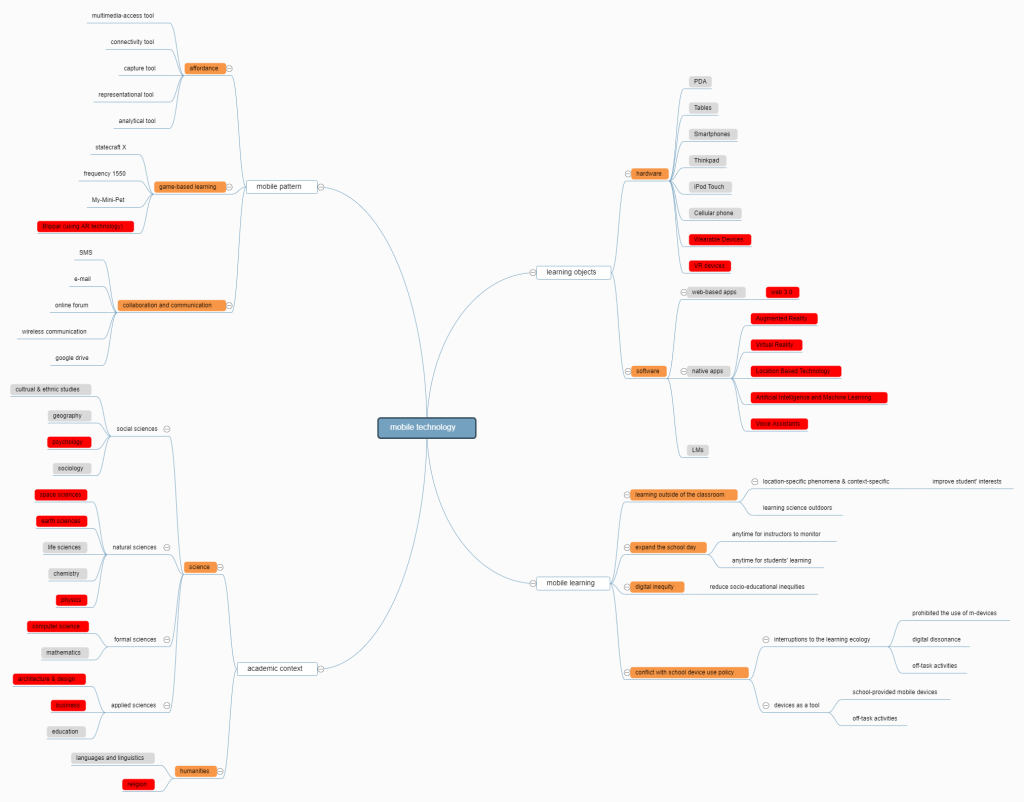
In this session, we have finished two tasks: first, we search some useful teaching apps and try to recommende these to other classmates; second we drew a mind map to show the major areas of educational research involving mobile technology.
1. Recommended Apps
In this session, we were try to find out some tools that support classroom teaching, such as those that support connection to a projector, mark-book, presentation tools, and classroom management tools. Examples of Apps are Moodle, Clicker School, TeacherPal, Prezi Viewer, Slides Shark, LanSchool Teacher. We recommended some apps below:
Create interactive lessons in minutes Save prep time by importing existing lessons (pdfs, jpegs, ppts) and adding Virtual Field Trips, Collaborate boards, Quizzes, Polls, Matching Pairs activities + more.Or, start in Google Slides add your favorite nearpod activities.
How this App can be used in the RASE learning design?
Students can use this app to give their teachers immediate feedback, and encourage students to give peer assessment.
Organize your thoughts, discoveries, and ideas and simplify planning important moments in your life with your digital notepad. Microsoft OneNote lets you take notes on your phone and sync them across all your devices. With OneNote, you can plan a big event, seize a moment of inspiration to create something new, and track your list of errands that are too important to forget. Take notes, write memos and make a digital sketchbook right on your phone. Capture pictures and add images to your notes. Sync notes across your devices to access them anytime, anywhere. Save ideas and check your list at home, in the office, or on the go across your devices. Search your notes quickly and effortlessly.
How this App can be used in the RASE learning design?
Resource: to record and synchronize useful materials across devicesActivity: to make notes or annotation in classSupport: building personal e-profile mobile knowledge management device Evaluation: Create a checklist of things-to-do, things-to-bring, and places-to-go and to demonstrate the organizational effectiveness of the app in assisting the management of daily life.
Weibo is a kind of broadcast social media and network platform based on user relationship information sharing, dissemination and acquisition, which shares short real-time information through attention mechanism. Users can access through PC, mobile phone and other mobile terminals, and realize real-time information sharing, dissemination and interaction in the form of text, picture, video and other multimedia.
How this App can be used in the RASE learning design?
People can use this app to post their feelings or learning experience with pictures or videos in time. Also, other people can give comments on it.
WeChat is more than a messaging and social media app – it is a lifestyle for over one billion users across the world. Chat and make calls with friends, read news and use local services in Official Accounts and Mini Programs, play fun games with friends, enjoy mobile payment features with WeChat Pay, and much more.
How this App can be used in the RASE learning design?
Resources: video, related link posting in a relevant subject,homework assign.Activity: online game based learning.Support: knowledge sharing, forum and online tutitorial.Evaluation: questionaire, peer assessment
A cloud drive that can be used to store files in it. It could be synced with another account aside from Google Account.
How this App can be used in the RASE learning design?
It could be used to store students’ files so they could share it with their peers without using flash disk as the traditional transferring files.
2. Mind Map
In this task, we read the paper《A Look at Research on Mobile Learning in K–12 Education From 2007 to the Present》, and identifed major areas of educational research involving mobile technology. Based on this paper, we draw a mind map tool to show major areas of educational research involving mobile technology. The other important areas have developed since 2014 that the paper did’t mention were marked red. If you want explore more, please visit: https://www.mindmeister.com/1361418112?t=NJl8UsuRcG#.
In this activity, we were instructed to design a small-scale study to identify key issues related to teaching and learning with mobile technologies. Here is our result.
Whether online courses including discussion forum can improve students’ learning motivation?
Introduction
Motivation is related to successful learning. Many researches highlight the importance of motivation in affecting learning. For example, Tallent-Runnels et al (2006) noted that an understanding of learners’ motivation is the key factor for effective instructional design. Researches have shown that learner motivation associated with a variety of important learning consequences such as persistence (Vallerand &Bissonnette, 1992), retention (Lepper & Cordova, 1992), achievement (Eccles et al., 1993), and course satisfaction (Fujita-Starck &Thompson, 1994). It can be concluded that motivation should be emphasized in the implementation of online learning.
As online learning opportunities continue to grow, it is important to explore how to sustain learner engagement and improve their motivation. However, some online learning platforms heavily rely on lecture video. A study suggests that it is critical to design more interaction among learners and between learners and lecturers to improve the quality of learning(Richardson et al., 2015). One of the useful tools for this purpose is an online forum for discussion. With the help of online discussion forums, learners can exchange opinions and form teams to collaborate and gain a better understanding of the material (Wise, Cui, Jin, & Vytasek, 2017). However, do interaction in online learning affect student motivation? This study aims to explore whether interaction in online learning can affect student motivation, and how interaction can affect the motivation.
Method
Participants
The participating university was a public university in Guangzhou, Guangdong Province, China. At the time of study, there were about 144 freshmen majoring in physics who will be selected to join the project. Students in this project worked together to learn online physics courses through the platform of Coursera.
School administration randomly selected 60 students from the freshman, and we randomly separated them into two groups. The first group called Strong Interaction Group(SIG), and the second group called Non-interaction Group(NIG). All the selected students had ownership of a computer at home, and many of them used computers regularly.
Procedure
Both groups would attend the physics courses through Coursera for four weeks, an hour a day twice a week. They needed to finish the assigned courses each week whenever and wherever they wanted. The content and form of the online courses for the two groups were in complete conformity with each other, but the SIG were given an online forum which had a teaching assistant to answer their questions about their homework (NIG needed to finish their homework without the assistance from online forum). The table 1. below summarizes the events during the whole study.
Table 1. Events during the whole study
Week 1
Week 2
Week 3
Week 4
(1)introduction the courses to the two groups
(1)attending the courses on platform of Coursera(SIG would be given an online forum)
(1)attending the courses on platform of Coursera (SIG would be given an online forum)
(1) implement a motivation scale
(2)implement a motivation scale
(2) implement a questionnaire to investigate the completion rate of online courses
Data Analysis
Before this experiment, we made two hypotheses: 1)Students with high learning motivation have a higher probability of obtaining course completion certificates than those with low learning motivation. 2)By adding online forum to online courses can improve the completion of the course and can cultivate students’ learning motivation, especially for those with low learning motivation. After this experiment, we will get 120 pieces of motivation scales and 60 pieces of questionnaires. The data collected in pre-test and post-test for each of these two groups will be analyzed with rapidminer software. We could apply ANOVA to determine whether there is a significant difference between the two groups’ motivation scales. If the p-value of one of the methods is smaller than 5%, then we could conclude that at 95% confidence level, there is a difference between the two teaching methods.
References
Tallent-Runnels, M., Thomas, J., Lan, W., Cooper, S., Ahern, T., Shaw, S., & Liu, X. (2006). Teaching Courses Online: A Review of the Research. Review of Educational Research,76(1), 93-135.
Vallerand, R., & Blssonnette, R. (1992). Intrinsic, Extrinsic, and Amotivational Styles as Predictors of Behavior: A Prospective Study. Journal of Personality,60(3), 599-620.
Lepper, M. R., & Cordova, D. I. . (1992). A desire to be taught: instructional consequences of intrinsic motivation. Motivation and Emotion,16(3), 187-208.
Eccles, J. S., Midgley, C., Wigfield, A., Buchanan, C. M., Reuman, D., & Flanagan, C., et al. (1993). Development during adolescence. the impact of stage-environment fit on young adolescents’ experiences in schools and in families. Am Psychol,48(2), 90-101.
JA Fujita-Starck. (1994). The effects of motivation and classroom environment on the satisfaction of noncredit continuing education students. air 1994 annual forum paper. Adult Education,2(3), 26.
Richardson, J. C., Koehler, A. A. , Besser, E. D., Secil, C., Jieun, L., & Mueller, C. M. . (2015). Conceptualizing and investigating instructor presence in online learning environments. The International Review of Research in Open and Distributed Learning,16(3).
Wise, A. F. , Cui, Y. , Wan, Q. J., & Vytasek, J. . (2016). Mining for gold: identifying content-related mooc discussion threads across domains through linguistic modeling. The Internet and Higher Education,32, 11-28.
Vallerand, Robert & Pelletier, Luc & Blais, MR & Brière, Nathalie & Senécal, Caroline & Vallieres, Evelyne. (1992). The Academic Motivation Scale: A Measure of Intrinsic, Extrinsic, and Amotivation in Education. Educational and Psychological Measurement. 52. 1003-1003. 10.1177/0013164492052004025.
In this activity, we were instructed to create a digital video for our lesson and include it into our new learning design plan from session 3. The digital video could be seen in the YouTube link below, have fun watching it!
Develop digital storytelling of Myopia an eye sickness for short-sightedness by last year secondary school students.
Learning Outcomes
By the end
of the lesson, the students will be able:
1. To define why people got Myopia (Recall – Personal – Declarative)
2. To explain how people got eye-sickness from their habit. (Explain – Popular – Procedural)
3. To develop a short video explaining a brief introduction of Myopia, how people got Myopia and how to prevent people from getting Myopia. (Apply – Concept – Critical).
Activity
1. Face-to-face Lecture
At the end
of this activity, students will be able to:
– understand
why people got Myopia
– understand
what habits that cause Myopia
– understand
what habits that prevent Myopia
– learn how
to cure Myopia with eye-exercise
– know the
examples of the video that will be created in the third activity.
2. video Workshop
At the end
of this activity, students will be able to:
– Develop a
digital video using iMovie or other software.
– Write a
script for a video.
– Have a
deeper understanding of their role in creating video.
– Upload
their video into YouTube or other websites.
3. Develop Digital Video
At the end
of this activity, students will be able to:
– explain to
the public what Myopia is, why people got Myopia, what habits that cause and
prevent Myopia, and how to cure Myopia with eye-exercise.
– understand
the roles of producer, script maker, cameraman, editor and actor.
– understand
how to utilize iMovie in making a video.
At the end of this activity, students will deliver:
– short video explaining about Myopia
Scenario: The students are an eye doctor that wants to give brief explanation about Myopia to the community. They must present a short video to help them illustrate Myopia so people could have a better understanding about it.
Resources
– Cameras
– Smartphone
–
Computer/Laptop
– iMovie
(Software for video editing tools compatible for Windows and Mac)or other
video edit software
– Real-time
teaching
– Lecturer
slides and notes
– Lecturer
reference materials
-An example of historical video
Support
F&Q
1. How long
the appropriate time for the video?
2. Can they
use video editing tools on mobile phone?
3. If a
group consists of 4 people, how to assign the role of each person?
4. How to
evaluate a peer who is a free-rider?
5. How to
install iMovie and other video edit software on Windows?
Email
For students
that have any further questions before or after class, the teacher will provide
his/her email.
Forums
For students
to share their videos or seek help from the teacher or their classmates.
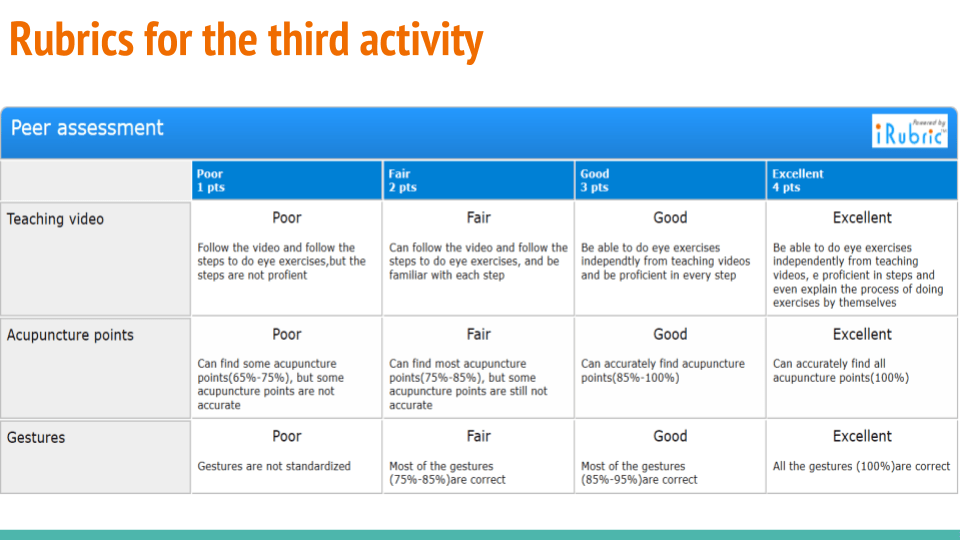
Peer assessment about the videos, each group can get feedback from other students.
Evaluation
Category
4
3
2
1
Point of View – Awareness of Audience
Strong awareness of audience in the design. Students can clearly explain why they felt the vocabulary, audio and graphics chosen fit the target audience.
Some awareness of audience in the design. Students can partially explain why they felt the vocabulary, audio and graphics chosen fit the target audience.
Some awareness of audience in the design. Students find it difficult to explain how the vocabulary, audio and graphics chosen fit the target audience.
Limited awareness of the needs and interests of the target audience.
Voice – Consistency
Voice quality is clear and consistently audible throughout the presentation.
Voice quality is clear and consistently audible throughout the majority (85-95%) of the presentation.
Voice quality is clear and consistently audible through some (70-84%)of the presentation.
Voice quality needs more attention.
Voice – Pacing
The pace (rhythm and voice punctuation) fits the story line and helps the audience really \”get into\” the story.
Occasionally speaks too fast or too slowly for the story line. The pacing (rhythm and voice punctuation) is relatively engaging for the audience.
Tries to use pacing (rhythm and voice punctuation), but it is often noticeable that the pacing does not fit the story line. Audience is not consistently engaged.
No attempt to match the pace of the storytelling to the story line or the audience.
Soundtrack – Originality
All of the music is original.
Most (over half) of the music is original.
Some of the music is original.
None of the music is original.
Soundtrack – Emotion
Music stirs a rich emotional response that matches the story line well.
Music stirs a rich emotional response that somewhat matches the story line.
Music is okay, and not distracting, but it does not add much to the story.
Music is distracting, inappropriate, OR was not used.
Images
Images create a distinct atmosphere or tone that matches different parts of the story. The images may communicate symbolism and/or metaphors.
Images create an atmosphere or tone that matches some parts of the story. The images may communicate symbolism and/or metaphors.
An attempt was made to use images to create an atmosphere/tone but it needed more work. Image choice is logical.
Little or no attempt to use images to create an appropriate atmosphere/tone.
Duration of Presentation
Length of presentation was 3 minutes.
Length of presentation was 2 minutes.
Length of presentation was 1 minutes.
Presentation was less than 1 minutes long OR more than 3 minutes.
Grammar
Grammar and usage were correct (for the dialect chosen) and contributed to clarity, style and character development.
Grammar and usage were typically correct (for the dialect chosen) and errors did not detract from the story.
Grammar and usage were typically correct, but errors detracted from story.
Repeated errors in grammar and usage distracted greatly from the story.
Point of View – Purpose
Establishes a purpose early on and maintains a clear focus throughout.
Establishes a purpose early on and maintains focus for most of the presentation.
There are a few lapses in focus, but the purpose is fairly clear.
It is difficult to figure out the purpose of the presentation.
In this Activity, we were told to create a proposal to a school principal, recommending an improvement to the school using multimedia. Here is our short proposal to the principal.
Our proposal
How to evaluate information on the Internet?
There are too many news stories produced every day, especially new media giving everyone a chance to produce their news. But every coin has two sides. On the one hand, this situation may broaden our horizons, but on the other hand, it may bring about more fake news than before.
Therefore, as a technology director in our school, I consider designing an e-booklet to help the students learn how to distinguish fake news from the resources on the Internet. The booklet may involve in two parts: first, a mind map listing all the key factors about how to evaluate website content; second, a game to give students a chance to experience a journalist’s work, and make a news story. We hope, in this way, the information literacy of our students can be improved.
As shown in figure 1, the booklet provides the guideline for students to distinguish information from the internet considering Author, Objectivity, Accuracy, and Audience aspects. Students can objectively judge the authenticity of news based on this guideline.
Figure 1. Distinguish Information Mind Map
In order to improve their motivation, we also provide a real-life simulation game for students to test whether they know how to distinguish fake information within the booklet. The real-life simulation game called iReporter created by BBC. In this game, students will act as a junior journalist who got accepted by the BBC recently. The students need to determine what kind of news they want to publish, from what source, why it is important to the public, and is it fake or not. Furthermore, the game will determine the students’ score within 3 main areas, there are accuracy, impact, and speed. Students with high scores have been considered knowledgeable to distinguish some information.
This is a feasibility proposal for IT teachers to integrate e-booklet with information technology in the IT curriculum to teach them how to search for reliable information.
This project can benefit students and school, improving students’ information literacy skills. First, Students understand not all the information on the Internet is reliable, and they should think critically by themselves when they are reading online. Second, students are able to critically distinguish trustworthy recourse from fake information by checking accuracy, reliable source and so on. Third, students can learn how to voice their own opinions accurately, which can help them to be responsible digital learners. Finally, the IT curriculum of school becomes much more meaningful and up to date, which can improve students’ motivation to learn.
In conclusion, if students have this e-booklet, they will have more opportunities to exercise their abilities to find the difference between the fake information and the true one, which is a significant skill in the modern world. Thus, teachers should not give any blind eyes to this literacy skills.
In this task, we were detecting two possible misconceptions related to our lesson topic from session 2. The table below shows the possible misconceptions and what is our plan to anticipate those misconception.
Group Nam
Topic
Two Misconceptions
Anticipated Learning Support
Nice2MeetU
Do you want to take off your glasses
1. Far-sightedness may be a misconception 2. Some of the examples of bad habits are not clear
1. Provide a video that tells the difference between short-sightedness and far-sightedness
2. Create a forum and ask the students to discuss in a group in the forum. The teacher will observe their discussion.
Task C
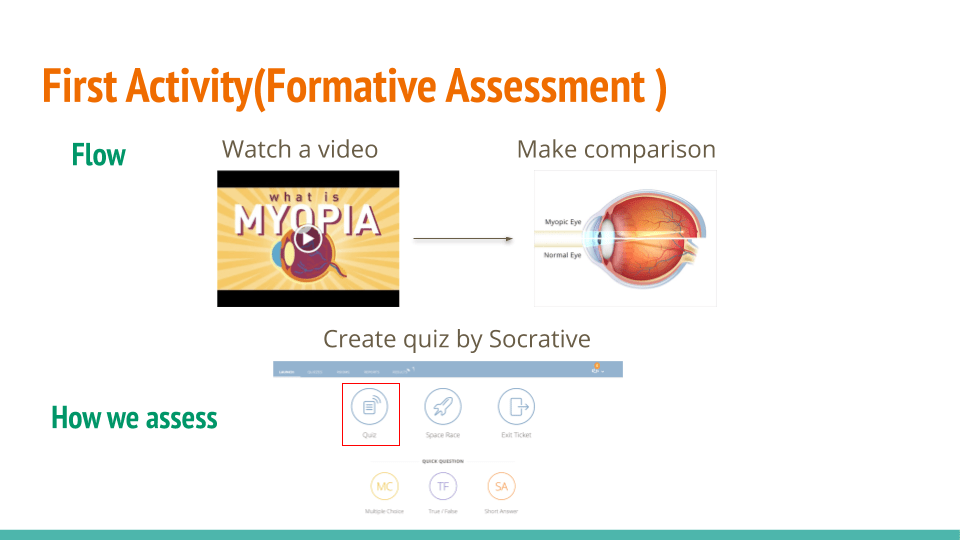
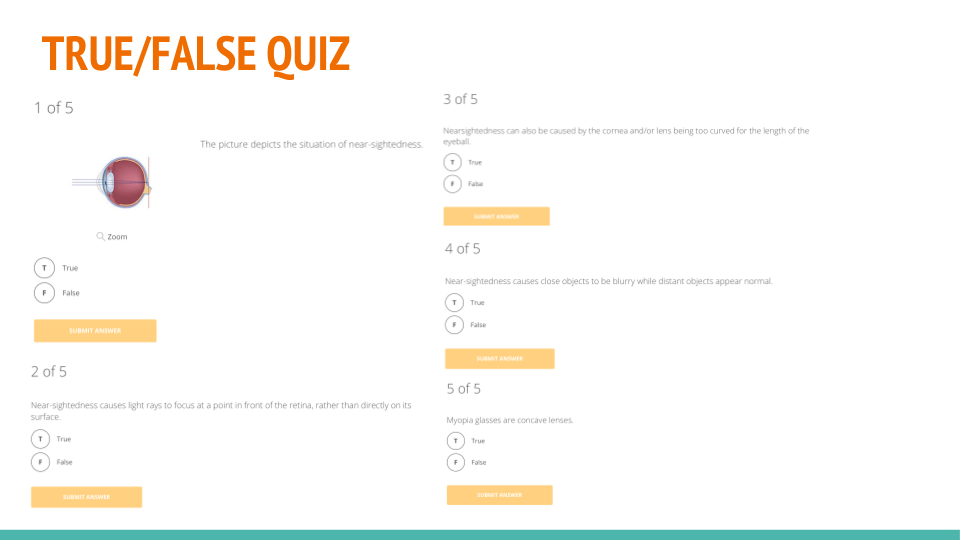
In this task, we were instructed to find and share some digital tools for students’ evaluation/assessment. Furthermore we were instructed to create the digital assessment instruments for our lesson.
The table below shows our result for the digital tools.
It could automatically distribute the assignment to eache students The teachere could see the result so they could have data-driven learning.
Nice2MeetU
Formative lets you create lessons using any Internet-connected device and is optimized for 1:1, BYOD, flipped or blended classrooms. Get results and respond in real time.
In this task, we were instructed to create a mind map about learning theories in order to implement our learning plan which theory is the most suitable for us. Here is our mind map. As you can see in this mind map, we divide the learning theory into three parts, behaviorism, cognitivism and constructivism.
In terms of the behaviorist learning theory, experts believe that the essence of learning can be generalized as a stimulus-reaction-enhancement process. Teachers are the controllers of learning, and students are passively accepting knowledge. Representatives in this theory are Thorndike, Pablov, Waston, Skinner et al.
In terms of the cognitivist learning theory, people hold the opinion that Learning knowledge is a combination of external and internal cognition. Some experts in this theory emphasize the process of information. Gagne, Piaget, Weiner are the representatives in this theory.
In terms of the constructivist learning theory, learning can be regarded as the process by which learners construct their own knowledge. Learners do not simply accept information, but actively construct the meaning of knowledge. Learning is the active selection, processing and processing of external information by learners based on their own experience background.
Finally, we think that in modern learning and teaching mode, people should give the priority to the learners’ initiative during the process of learning. Students can be the leaders of learning and can choose what they want to learn. Also, situated learning might be suitable for modern education. With the development of technology, many new teaching techniques have emerged,like AR technology, VR technology and so on. Those new technologies applied in the field of education gives students an immersive learning environment, which is beneficial for their better understanding.
Activity
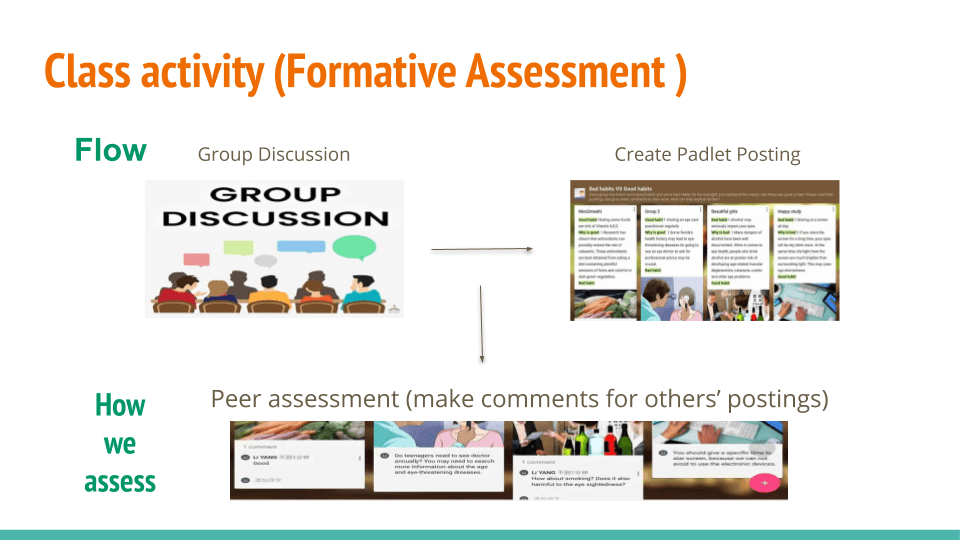
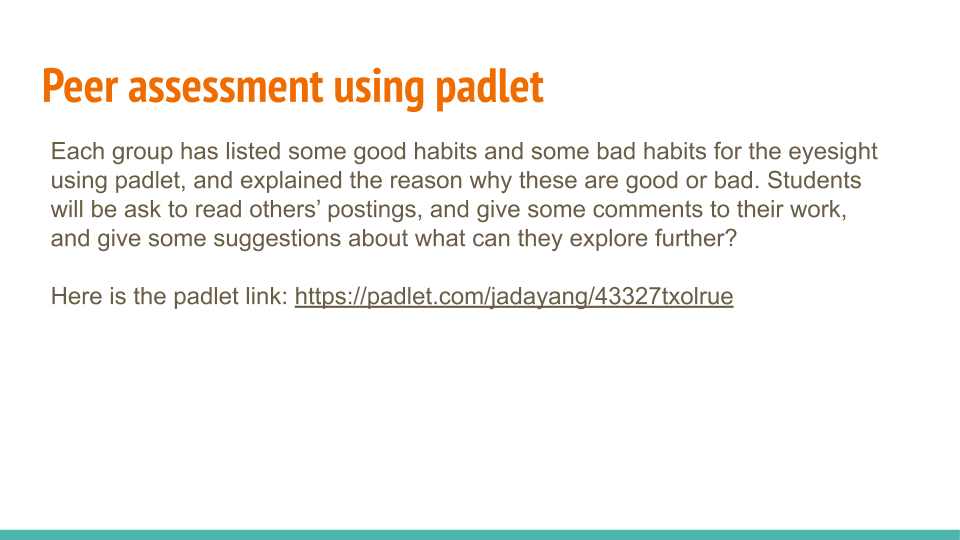
For the activity of this lesson, we were instructed to create an active lesson using PPT as a tools for our active lesson. Because our topic in session 1 is not specific so we tried change our topic into explaining Myopia eye sickness. Here is our PPT that could be viewed and downloaded.
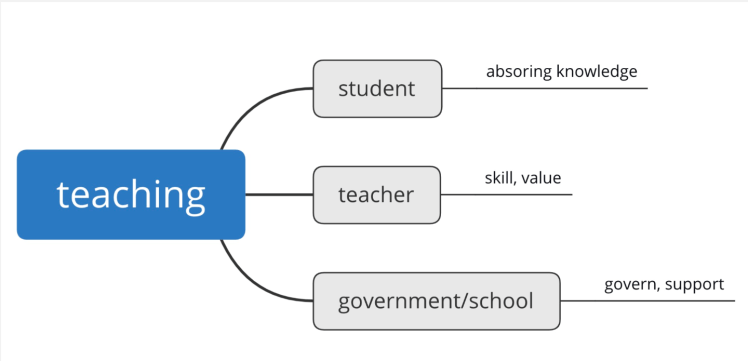
In this task we were instructed to create a mind map to define what is teaching and learning from our experience. So, here are our mind map.
Figure 1. Teaching Mind MapFigure 2. Learning Mind Map
These mind maps were based on our experience in learning and teaching. In traditional teaching mode in China, teaching can be divided into three levels, students, teachers, and schools. They are all very significant and work together. For students, they are able to learn knowledge from teachers and their peers. The teacher plays the role of imparting knowledge, those who are very experienced. Governments and schools should give teachers great support in teaching equipment, funding, and so on.
For learning, we list some keywords in the mind map. There are some reasons why people need to learn something new. Firstly, we think that those who are little-known and want to avoid making mistakes in their lives and studies have a strong willingness to learn. Then, learning is beneficial to their thinking abilities. Also, when people attach great importance to learn, they can expand their knowledge.
Activity
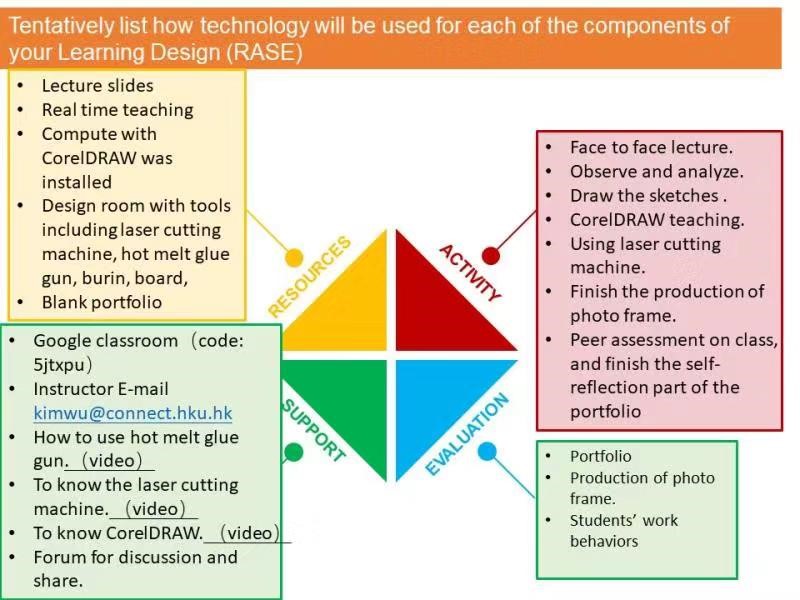
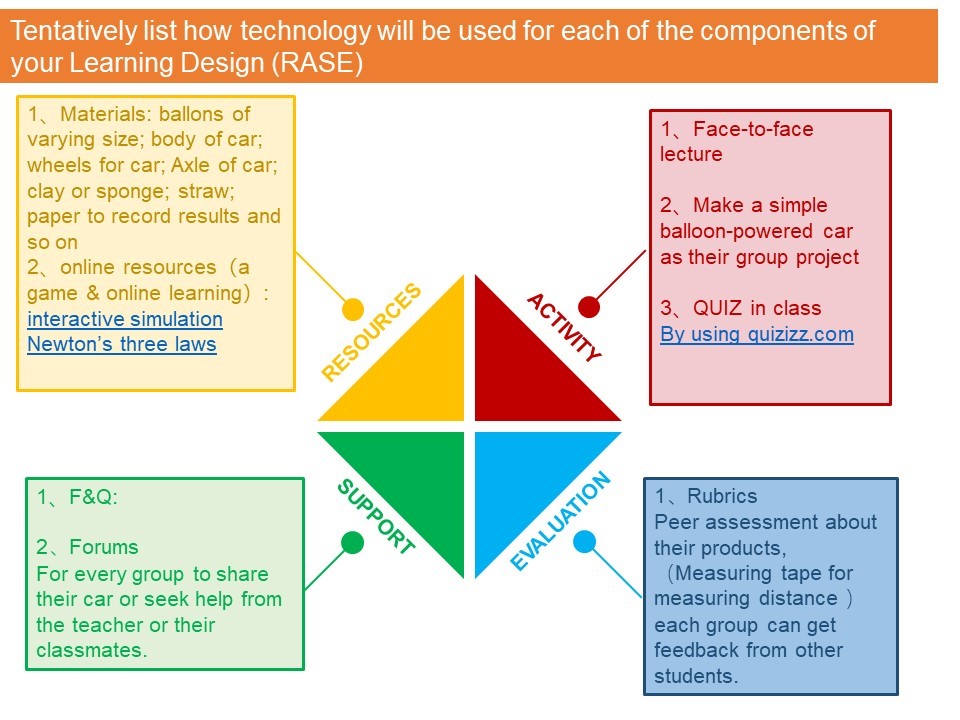
As for our activity, we designed a simple learning design plan of a lesson based on the RASE framework. Here is our learning design plan.
Topic of a Learning Unit:
Creating a documentary video for last year of high school students by utilizing drones, cameras and video editing tools.
Learning Outcomes:
By the end
of the lesson, the students will be able:
To
understand the operational principle of drones and cameras, and also define
different video making methods. (Recall
– Personal – Declarative)
To explain
how to capture a video by using drones and cameras, how to create and edit a
video using video maker tools(iMovie), know how to write a script for a movie.
(Explain – Popular – Procedural)
To produce a documentary, propaganda and promotional video for the school achievement as it can be used for graduation ceremony and Vlog of their daily school life. (Apply – Concept – Critical)
Activity:
1. Face-to-face Lecture
At the end
of this activity, students will be able to:
– learn how
to make a video with different methods.
– understand
what drones and cameras are for
At the end
of this activity, learners will deliver:
– the basic
operation principle of drones and cameras
Scenario:
The teacher will have a face-to-face lecture with the students to explain how
to make a video and what drones and cameras are for.
2. Form Groups and Conduct Group Discussion
At the end
of this activity, students will be able to:
– have a
deeper understanding of drones and cameras.
– have a
deeper understanding about methods of making video.
– understand
the roles of producer, script maker, cameraman, editor and actor
At the end
of this activity, learners will deliver:
–
collaboration and communication
Scenario:
The teacher will ask the students to form a group of 5 (based on the role),
assign each person to a role and conduct group discussion.
3. Show some video samples and criticize them.
At the end
of this activity, students will be able to:
– know the
examples of the video that will be created.
– have
critical thinking which is a good video and a bad video.
At the end
of this activity, learners will deliver:
– self
judgement about videos
Scenario:
The teacher will provide video samples in the Google Classroom then the
students will have to review the samples from their own perspectives.
4. Make a 2 minutes video about their daily life in school
At the end
of this activity, students will be able to:
– capture a
video using cameras and drones
– edit a
video using iMovie.
– write a
script for a movie.
– create a
documentary, propaganda and promotional video
– have a
deeper understanding of their role.
–
demonstrate their own video to the public.
– uploading
their video into YouTube or other websites.
– promote
their own video to the public.
– present
the process of making the video.
At the end
of this activity, learners will deliver:
– final
group project video
– final
project presentation in the class.
Scenario:
1. The
teacher will give a final group project assignment in the Google Classroom to
make a 2 minutes video about daily life in school. Then, each group will try to
create the video from what they have learned.
2. The teacher will arrange the final project presentation date in the Google Classroom. While waiting for the presentation day, the students will be prompted to upload their video to YouTube and promote their own video to the public. The best video and the most popular video will be awarded something by the teacher.
Resources:
– Cameras
– Drones
– Smartphone
–
Computer/Laptop
– iMovie
(software for video editing tools compatible for Windows and Mac)
– Real-time
teaching
– Lecturer
reference materials
– Lecturer slides and notes
Support:
F&Q
1. How to
operate a drone or a camera?
2. How to
output the videos from drone and camera to iMovie for editing?
3. How long
the appropriate time for a documentary?
4. Can they
use video editing tools besides iMovie?
5. If a
group consists of 4 people, how to assign the role of each person?
6. Is
popular means that we have the most liked or the most viewed video?
7. How to
evaluate a peer who is a free-rider?
8. How to
install iMovie on Windows?
Email
For students
that have any further questions before or after class, the teacher will provide
his/her email.
Forums
For students to share their videos or seek help from the teacher or their classmates.
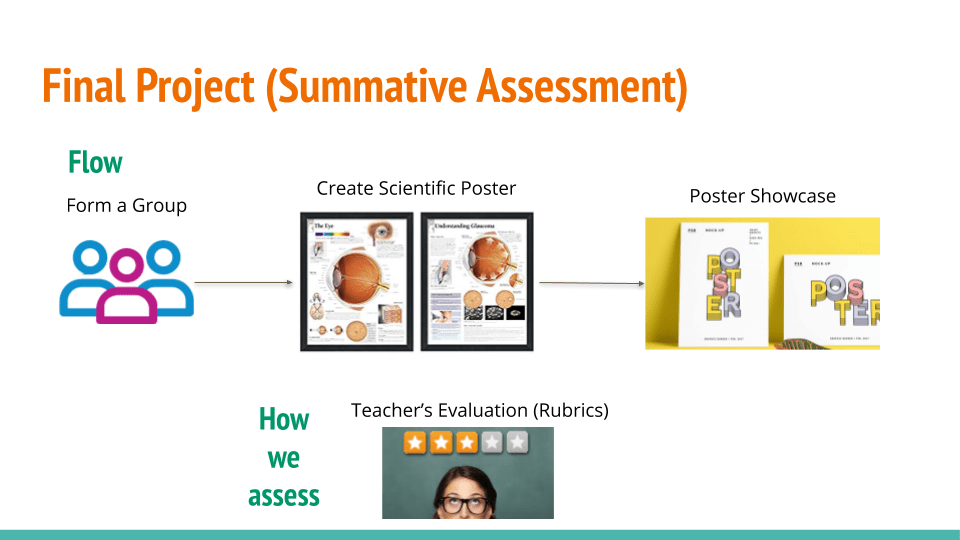
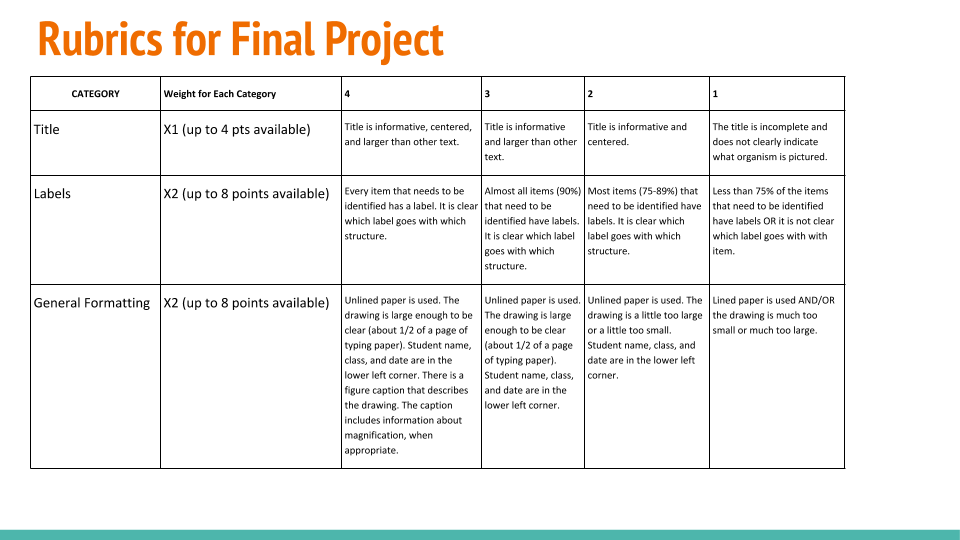
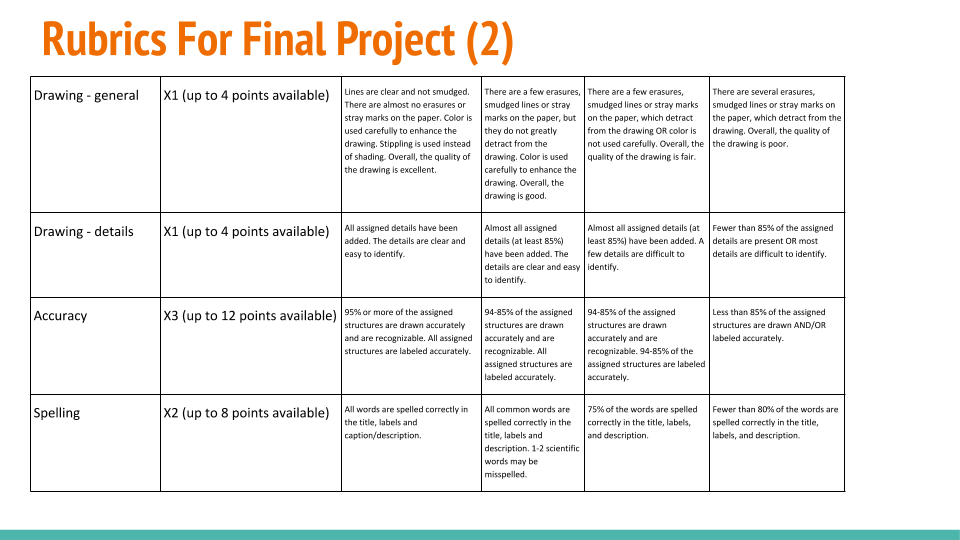
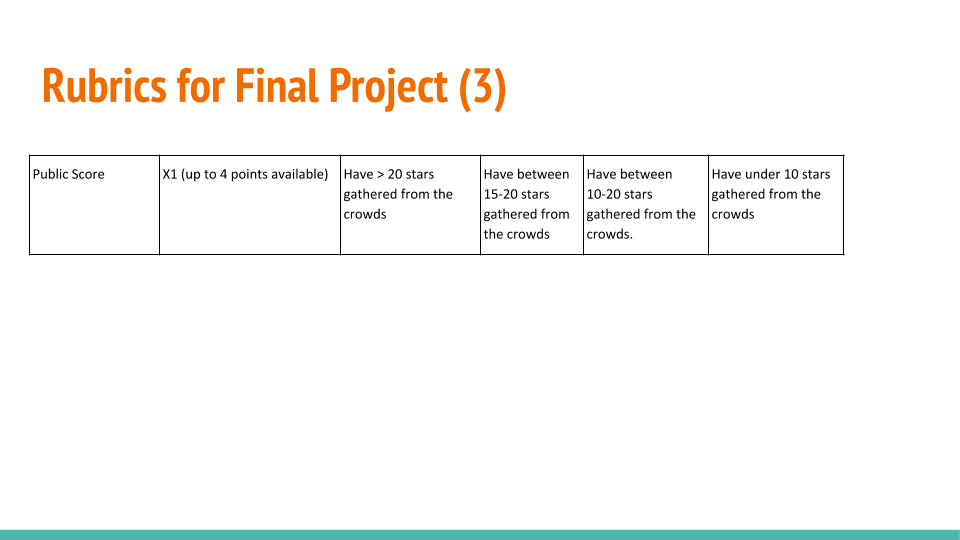
Evaluation
Peer assessment
Students
will assess their classmates’ videos on Google Classroom.
Peer review
Students
will review their peer groups contribution using Google Classroom.
Self-review
Students portfolios will be reviewed using Google Classroom for each topic they have learned.
Category
4
3
2
1
Score
Teamwork
Students meet and discuss regularly. All students contribute to the discussion and all are listened to respectfully. All team members contribute a fair share of the work.
Students meet and discuss regularly. Most students contribute to the discussion and are listened to respectfully. All team members contribute a fair share of the work.
A couple of team meetings are held. Most students contribute to the discussion and are listened to respectfully. All team members contribute a fair share of the work.
Meetings are not held AND/OR some team members do not contribute a fair share of the work.
Concept
Team has a clear picture of what they are trying to achieve. Each member can describe what they are trying to do and generally how his/her work will contribute to the final product.
Team has a fairly clear picture of what they are trying to achieve. Each member can describe what they are trying to do overall but has trouble describing how his/her work will contribute to the final product.
Team has brainstormed their concept, but no clear focus has emerged for the team. Team members may describe the goals/final product differently.
Team has spent little effort on brainstorming and refining a concept. Team members are unclear on the goals and how their contributions will help them reach the goal.
Script
Script is complete and it is clear what each actor will say and do. Entries and exits are scripted as are important movements. Script is quite professional.
Script is mostly complete. It is clear what each actor will say and do. Script is shows planning.
Script has a few major flaws. It is not always clear what the actors are to say and do. Script shows an attempt at planning, but seems incomplete.
There is no script. Actors are expected to invent what they say and do as they go along.
Storyboard
Storyboard is complete with sketches for each scene, detailed notes on titles, transitions, special effects, sound, etc. Storyboard reflects outstanding planning and organization for the visuals in the video.
Storyboard is relatively complete with sketches for most scenes, and notes on titles, transitions, special effects, sound, etc. Storyboard reflects effective planning and organization for the visuals in the video.
Storyboard has glaring omissions in scene planning. There are some sketches, and notes on titles, transitions, special effects, sound, etc. Storyboard reflects attempts at planning and organization for the visuals in the video.
Storyboard is not done or is so incomplete that it could not be used even as a general guide. Storyboard reflects very little planning of the visuals.
Equipment Preparation
All necessary equipment/supplies are located and scheduled well in advance. All equipment (sound, light, video) is checked the day before the shoot to ensure it is operational. A backup plan is developed to cover possible problems with power, light, etc.
All necessary equipment/supplies are located and scheduled a few days in advance. All equipment (sound, light, video) are checked the day before the shoot to ensure they are operational. A backup plan is developed.
On the day of the shoot, all necessary equipment/supplies are located and checked to ensure they are operational. There may or may not be a backup plan.
Needed supplies/equipment are missing OR were not checked before the shoot.
Sound Setup
Microphones are positioned optimally to ensure that important sounds and dialogue are captured. The team has made every attempt to anticipate and filter out unwanted ambient noise in the recording.
Microphones are positioned optimally to ensure that important sounds and dialogue are captured.
At least one microphone (in addition to that on the camera) is used to ensure that dialogue is captured.
Little attention was paid to ensuring quality sound during the shoot.
Lighting Setup
Additional lighting has been used to eliminate shadows and glares. Cameras are set to the appropriate light level.
Additional lighting has been used, but may not be set up optimally. Cameras are set to the appropriate light level.
Cameras are set to appropriate light level, but no additional lighting was used when needed.
Cameras Drone are not set to appropriate light level. Additional lighting may, or may not, be used.
My Learning design is available for viewing at:
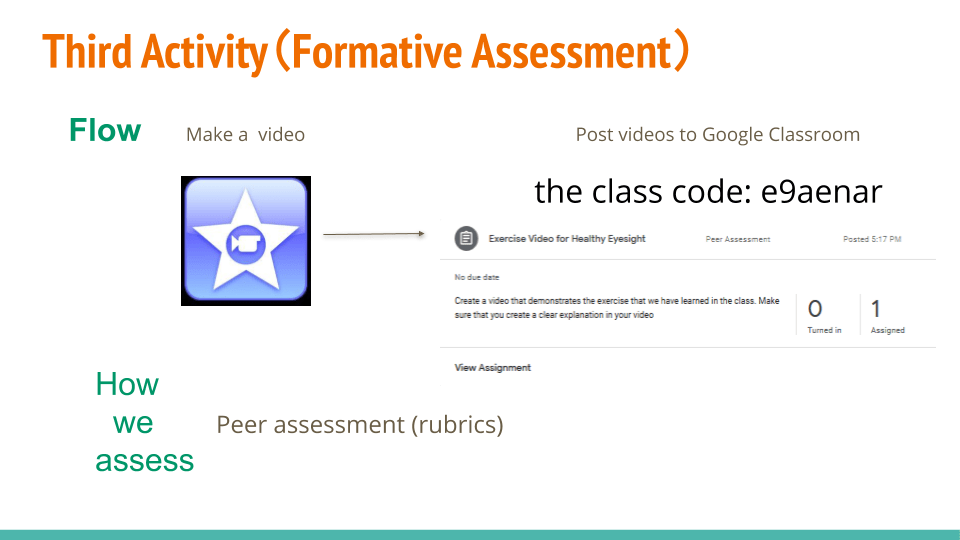
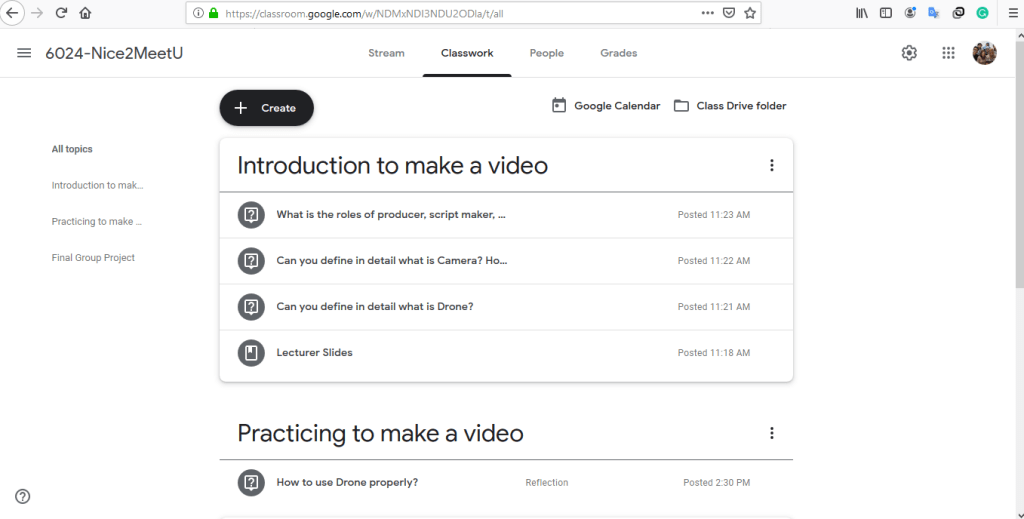
Google classroom, access the classroom.google.com and input the class code: e9aenar. Here is our screenshots of our Google Classroom.
Theoretical Perspective:
Contemporary
learning outcomes are based on the theory of knowledge dimension model. We
could see how they occur within these steps. According to the category of
content knowledge, teachers give a definition of relevant principles, which can
also be regarded as a review of what they already know about the knowledge of
audio-video making. Then the students can have a deep understanding of the
knowledge construction during the process of teaching activities. Finally,
students can transform what they have learned into something that can be
applied or even create an innovation. Thus, in this way, the teachers will act
as a facilitator.
We design
the activity based on the RASE model. The RASE model is the student-centered
learning design model, it contains four components: Resources, Activity,
Support, and Evaluation. The four elements need to be well designed for full
achievement of learning outcomes. The RASE model is significant because it can
assist teachers on how to design better courses and promote the use of
information technology in education to educate digital learners.
There might
be four key factors that make learning occur. First, facilitators should
examine the learners’ expectations at the very beginning of the course. They
should also cover various teaching methods and activities to maintain the
learners’ motivations and interests. Second, learners should be encouraged to
reflect on what they have learned by using a reasonable assessment and feedback
system. Third, facilitators may need to provide the learners with enough
support, such as learning resources, reactions, and answers to their questions.
Finally, the
education reform purpose is to allow the learners to become life-long learners.
In other words, the learners have life-long study awareness and abilities.









 Nice2MeetU Group's E-Portfolio